



Veeam 13 Calculator
In this article, I’ll briefly explain the Veeam Backup calculation tool.
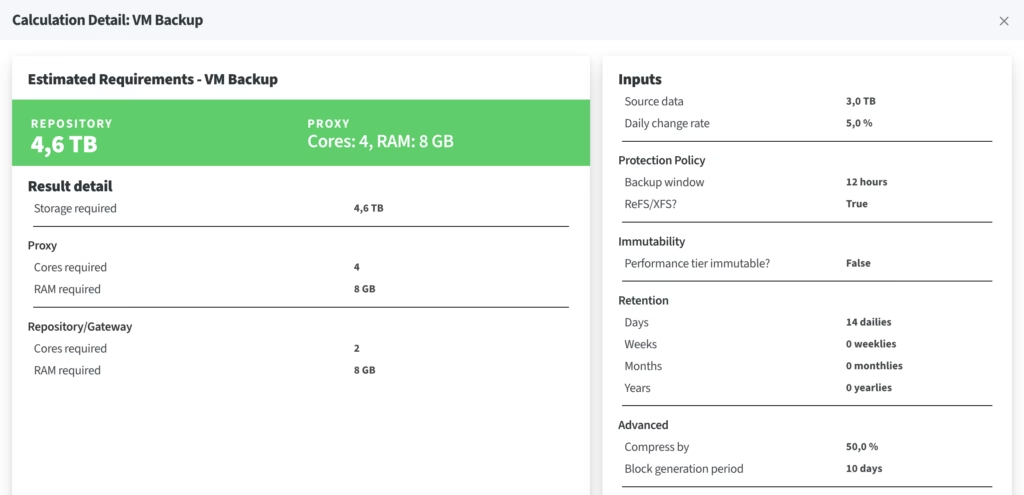
This tool allows you to perform various calculations across all versions of the Veeam application (onprem, saas, data cloud, etc.). For example, you can use this tool to determine how many TB of storage space a specific backup scenario will take up. It also provides information on daily growth, retention time, and the required proxy machine specifications for each scenario. You can see an example scenario below.
Link: Veeam Backup Calculator
İçindekiler
ToggleWhat Is the Veeam Backup Calculator?
The Veeam Backup Calculator is Veeam’s official sizing tool — linked above — that estimates how much backup storage you need for Veeam Backup & Replication 13. Enter your source data size, daily change rate and retention policy, and it instantly estimates your full backup size, incremental sizes and the total repository capacity you should provision — before you buy a single disk. It covers on-prem Backup & Replication as well as SaaS and Veeam Data Cloud scenarios.
As a system administrator running Veeam in production, I do this same sizing math before every repository purchase and every backup design meeting. This guide explains how to use the calculator correctly and — more importantly — how to sanity-check the numbers it gives you.
How to Use the Veeam Calculator (Step by Step)
- Enter your source data size. Use the actual used space of the VMs and servers you protect, not the provisioned disk size.
- Set the daily change rate. Around 5% is typical for general-purpose VMs; database and file servers often run at 10% or more.
- Choose your retention. Decide how many restore points you keep — 14 to 30 is the most common range.
- Pick your backup mode. Forward incremental with periodic fulls, forever forward incremental, or reverse incremental — each changes how much space the chain consumes.
- Review the results. The calculator returns the estimated full backup size, incremental size per restore point and total repository capacity.
How Veeam Backup Sizing Actually Works
Full backups and compression
A full backup is rarely the same size as your source data. With Veeam’s default compression and deduplication, a practical planning assumption is roughly a 2:1 reduction — so a 10 TB environment typically produces a full backup file of about 5 TB. Highly compressible data (databases, text, logs) shrinks more; media files and encrypted data barely shrink at all.
Incremental backups and daily change rate
After the first full, Veeam only stores changed blocks. The daily change rate is therefore the single most important number in your sizing: a 10 TB environment with a 5% change rate writes roughly 500 GB of changed data per day, which lands closer to 250 GB per restore point after compression.
Retention, restore points and the 3-2-1 rule
Your retention policy multiplies everything: more restore points means more increments (and more periodic fulls) kept on disk. And remember that repository sizing covers only one copy — the classic 3-2-1 rule (3 copies of your data, on 2 different media, 1 offsite) means your primary repository is just the first leg of the design.
Example: Sizing a 10 TB Environment
Say you protect 10 TB of used data with a 5% daily change rate and 14 restore points: the full backup lands around 5 TB after compression, and each incremental at roughly 250 GB. That chain adds up to about 5 TB + (13 × 0.25 TB) ≈ 8.3 TB. Add 15–20% free-space headroom for growth and synthetic full operations, and a 10–11 TB repository is a comfortable target. The official calculator runs exactly this logic with your own numbers — use the example here to sanity-check its output.
Veeam Backup Calculator FAQ
How much storage do I need for Veeam backups?
As a rule of thumb: plan for a full backup at about 50% of your source data size, plus one compressed incremental per restore point, plus 15–20% free-space headroom. For precise planning, run the calculator with your real change rate.
What daily change rate should I use?
If you don’t have historical data, start with 5% for mixed VM workloads and 10% for database-heavy servers. After a few weeks of real backups, check your actual incremental file sizes and refine the estimate.
Does this calculator work for Veeam 12 as well as Veeam 13?
Yes. The underlying sizing math — compression ratio, change rate, retention and backup mode — is the same across recent Veeam Backup & Replication versions, so the estimates apply to v12 and v13 environments alike.
Where do I find the official Veeam calculator?
Veeam hosts it at veeam.com/calculators and it is free to use — the link at the top of this page takes you straight there. No login is required for basic sizing scenarios.
Note: all results are planning estimates. Real-world consumption depends on your data type, encryption, deduplication and job settings — always validate with a pilot backup job.
Sizing the compute side of your environment too? See my Azure Pricing Calculator guide for estimating VM and infrastructure costs the same way.